avatar

目录
Impala-高性能SQL查询

Impala的基本概念

什么是Impala

  • Cloudera公司推出,提供对HDFS、Hbase数据的高性能、低延迟的交互式SQL查询功能。

  • 基于Hive,使用内存计算,兼顾数据仓库、具有实时、批处理、多并发等优点。

  • 是CDH平台首选的PB级大数据实时查询分析引擎。

Impala的优缺点

优点

  • 基于内存运算,不需要把中间结果写入磁盘,省掉了大量的I/O开销。
  • 无需转换为Mapreduce,直接访问存储在HDFS,HBase中的数据进行作业调度,速度快。
  • 使用了支持Data locality的I/O调度机制,尽可能地将数据和计算分配在同一台机器上进行,减少了网络开销。
  • 支持各种文件格式,如TEXTFILE 、SEQUENCEFILE 、RCFile、Parquet。
  • 可以访问hive的metastore,对hive数据直接做数据分析。

缺点

  • 对内存的依赖大,且完全依赖于hive。
  • 实践中,分区超过1万,性能严重下降。
  • 只能读取文本文件,而不能直接读取自定义二进制文件。
  • 每当新的记录/文件被添加到HDFS中的数据目录时,该表需要被刷新。

Impala的架构

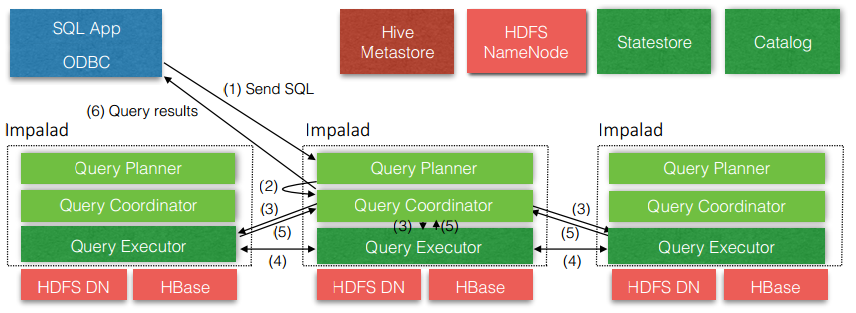
图片1

从上图可以看出,Impala自身包含三个模块:Impalad、Statestore和Catalog,除此之外它还依赖Hive Metastore和HDFS。

1) Impalad:

接收client的请求、Query执行并返回给中心协调节点;

子节点上的守护进程,负责向statestore保持通信,汇报工作。

2) Catalog:

分发表的元数据信息到各个impalad中;

接收来自statestore的所有请求。

3) Statestore:

负责收集分布在集群中各个impalad进程的资源信息、各节点健康状况,同步节点信息;

负责query的协调调度

Impala的安装&启动&使用

使用CM,先启动HDFS、HIVE 、再启动Impala

Impala 的监护管理

Code
1
2
3
4
- 查看StateStore
http://hadoop103:25020/
- 查看Catalog
http://hadoop103:25010/

启动

shell
1
2
3
4
5
6
7
8
9
10
11
12
13
14
15
16
17
18
19
20
21
22
impala-shell
> show databases;
# 打开默认数据库
> use default;
# 查的是hive
> show tables;
# 创建一张student表
> create table student(id int, name string)
> row format delimited
> fields terminated by '\t';
# 向表中导入数据
> load data inpath '/student.txt' into table student;

# 注意
1) 关闭(修改hdfs的配置dfs.permissions为false)或修改hdfs的权限,否则impala没有写的权限
hadoop fs -chmod -R 777 /
2) Impala不支持将本地文件导入到表中

# 查询
> select * from student;
# 退出impala
> quit;

Impala的操作命令

Impala的外部shell

shell
1
2
3
4
5
6
7
8
9
10
11
12
13
14
15
16
17
18
19
20
21
22
23
24
25
26
27
28
29
30
31
32
33
34
35
36
37
38
39
40
41
42
43
44
45
46
47
48
49
50
51
52
53
54
55
56
57
-q query, --query=query
从命令行中传递一个shell 命令。执行完这一语句后 shell 会立即退出。

-f query_file, --query_file= query_file
传递一个文件中的 SQL 查询。文件内容必须以分号分隔

-o filename or --output_file filename
保存所有查询结果到指定的文件。通常用于保存在命令行使用 -q 选项执行单个查询时的查询结果。

-r or --refresh_after_connect
建立连接后刷新 Impala 元数据

-p, --show_profiles
对 shell 中执行的每一个查询,显示其查询执行计划 


# 使用-q查询表中数据,并将数据写入文件中
impala-shell -q 'select * from student' -o output.txt
# 查询执行失败时继续执行
$ vim impala.sql
select * from student;
select * from stu;
select * from student;
$ impala-shell -f impala.sql;
$ impala-shell -c -f impala.sql;

# 在hive中创建表后,使用-r刷新元数据
hive> create table stu(id int, name string);
> show tables;
Query: show tables
+---------+
| name |
+---------+
| student |
+---------+
$ impala-shell -r
> show tables;
Query: show tables
+---------+
| name |
+---------+
| stu |
| student |
+---------+

# 显示查询执行计划(做查询优化时使用)
$ impala-shell -p
> select * from student

# 去格式化输出
$ impala-shell -q 'select * from student' -B --output_delimiter="\t" -o output.txt
# 没有那个方块了,便于导出到其他地方
$ cat output.txt
1001 tignitgn
1002 yuanyuan
1003 haohao
1004 yunyun

Impala的内部shell

shell
1
2
3
4
5
6
7
8
9
10
11
12
13
14
15
16
17
explain <sql>
显示执行计划

profile
(查询完成后执行) 查询最近一次查询的底层信息

shell <shell>
不退出impala-shell执行shell命令

refresh <tablename>
增量刷新元数据库

invalidate metadata
全量刷新元数据库(慎用)(同于 impala-shell -r)

history
历史命令

使用

shell
1
2
3
4
5
6
7
8
9
10
11
12
13
14
15
1.	查看执行计划
explain select * from student;
2. 查询最近一次查询的底层信息
[hadoop103:21000] > select count(*) from student;
[hadoop103:21000] > profile;
3. 查看hdfs及linux文件系统
[hadoop103:21000] > shell hadoop fs -ls /;
[hadoop103:21000] > shell ls -al ./;
4. 刷新指定表的元数据
hive> load data local inpath '/opt/module/datas/student.txt' into table student;
[hadoop103:21000] > select * from student;
[hadoop103:21000] > refresh student;
[hadoop103:21000] > select * from student;
5. 查看历史命令
[hadoop103:21000] > history;

Impala的数据类型

Hive数据类型 Impala数据类型 长度
TINYINT TINYINT 1byte有符号整数
SMALINT SMALINT 2byte有符号整数
INT INT 4byte有符号整数
BIGINT BIGINT 8byte有符号整数
BOOLEAN BOOLEAN 布尔类型,true或者false
FLOAT FLOAT 单精度浮点数
DOUBLE DOUBLE 双精度浮点数
STRING STRING 字符系列。可以指定字符集。可以使用单引号或者双引号。
TIMESTAMP TIMESTAMP 时间类型
BINARY 不支持 字节数组

注意:Impala虽然支持array,map,struct复杂数据类型,但是支持并不完全,一般处理方法,将复杂类型转化为基本类型,通过hive创建表。

DDL数据定义

创建数据库

Code
1
2
3
CREATE DATABASE [IF NOT EXISTS] database_name
  [COMMENT database_comment]
  [LOCATION hdfs_path];

注:Impala不支持WITH DBPROPERTIE…语法

查询&删除数据库

查询

shell
1
2
3
4
5
6
7
8
9
10
11
12
13
14
15
> show databases;
> show databases like 'hive*';
Query: show databases like 'hive*'
+---------+---------+
| name | comment |
+---------+---------+
| hive_db | |
+---------+---------+
> desc database hive_db;
Query: describe database hive_db
+---------+----------+---------+
| name | location | comment |
+---------+----------+---------+
| hive_db | | |
+---------+----------+---------+

删除

shell
1
2
> drop atabase hive_db;
> drop database hive_db cascade;

注:

Impala不支持alter database语法

当数据库被 USE 语句选中时,无法删除

创建表

管理表

shell
1
2
3
4
5
6
7
[hadoop103:21000] > create table if not exists student2(
> id int, name string
> )
> row format delimited fields terminated by '\t'
> stored as textfile
> location '/user/hive/warehouse/student2';
[hadoop103:21000] > desc formatted student2;

外部表

shell
1
2
3
4
> create external table stu_external(
> id int,
> name string)
> row format delimited fields terminated by '\t' ;

分区表

创建分区表

shell
1
2
3
4
> create table stu_par(id int, name string)
> partitioned by (month string)
> row format delimited
> fields terminated by '\t';

向表中导入数据

shell
1
2
3
4
[hadoop103:21000] > alter table stu_par add partition (month='201810');
[hadoop103:21000] > load data inpath '/student.txt' into table stu_par partition(month='201810');
[hadoop103:21000] > insert into table stu_par partition (month = '201811')
> select * from student;

注意:

如果分区没有,load data导入数据时,不能自动创建分区。

查询分区表中的数据

Code
1
> select * from stu_par where month = '201811';

增加多个分区

Code
1
> alter table stu_par add partition (month='201812') partition (month='201813');

删除分区

Code
1
>  alter table stu_par drop partition (month='201812');

查看分区

Code
1
> show partitions stu_par;

DML数据操作

数据导入(基本同hive类似)

注意:impala不支持load data local inpath…

数据的导出

  1. impala不支持insert overwrite…语法导出数据

  2. impala 数据导出一般使用 impala -o

Code
1
2
3
4
5
6
[root@hadoop103 ~]# impala-shell -q 'select * from student' -B --output_delimiter="\t" -o output.txt
[root@hadoop103 ~]# cat output.txt
1001 tignitgn
1002 yuanyuan
1003 haohao
1004 yunyun

Impala 不支持export和import命令

查询

  1. 基本的语法跟hive的查询语句大体一样

  2. Impala不支持CLUSTER BY, DISTRIBUTE BY, SORT BY

  3. Impala中不支持分桶表

  4. Impala不支持COLLECT_SET(col)和explode(col)函数

  5. Impala支持开窗函数

    Code
    1
    [hadoop103:21000] > select name,orderdate,cost,sum(cost) over(partition by month(orderdate)) from business;

函数

自定义函数

导入依赖

xml
1
2
3
4
5
<dependency>
<groupId>org.apache.hive</groupId>
<artifactId>hive-exec</artifactId>
<version>1.2.1</version>
</dependency>

创建一个类

java
1
2
3
4
5
6
7
8
9
10
11
12
13
package com.mxx.hive;
import org.apache.hadoop.hive.ql.exec.UDF;
public class Lower extends UDF {

public String evaluate (final String s) {

if (s == null) {
return null;
}

return s.toLowerCase();
}
}

打成jar包上传到服务器,将jar包上传到hdfs的指定目录

Code
1
hadoop fs -put hive_udf-0.0.1-SNAPSHOT.jar /

创建函数

Code
1
[hadoop103:21000] > create function mylower(string) returns string location '/hive_udf-0.0.1-SNAPSHOT.jar' symbol='com.mxx.hive.Lower';

使用自定义函数

Code
1
> select ename, mylower(ename) from emp;

通过show functions查看自定义的函数

Code
1
2
3
4
5
6
7
> show functions;
Query: show functions
+-------------+-----------------+-------------+---------------+
| return type | signature | binary type | is persistent |
+-------------+-----------------+-------------+---------------+
| STRING | mylower(STRING) | JAVA | false |
+-------------+-----------------+-------------+---------------+

存储和压缩

优化

文章作者: Machine
文章链接: https://machine4869.gitee.io/2019/11/11/20191111111820425/
版权声明: 本博客所有文章除特别声明外,均采用 CC BY-NC-SA 4.0 许可协议。转载请注明来自 哑舍
打赏
  • 微信
    微信
  • 支付宝
    支付宝

评论